Pay by Link: How Payment Links Work for Businesses
Discover how pay by link helps businesses collect payments without a website or physical card terminal. Learn how to create payment links, track sales and accept remote payments safely.
Not every sale takes place at a shop counter or on a website. Some customers place orders over the phone, through social media or on WhatsApp. Pay by link gives businesses a simple way to collect payments from these customers.
Instead of asking customers to visit a store or share their card details over the phone, merchants can send a payment link.
Customers can then open the link and pay from their own device. As a result, businesses can sell and collect payments even when their customers are not present.
What Is Pay by Link?
Pay by link is a payment method that allows businesses to request money through a shareable link. Customers open the link, review the amount and pay using an available payment method.
Unlike a standard online checkout, payment links do not require a business to have its own online store.
For example, a clothing shop can take an order through WhatsApp and send a link to collect the payment. Once the customer pays, the shop can prepare the order for delivery.
How Does Pay by Link Work?
The process is simple for both merchants and customers.
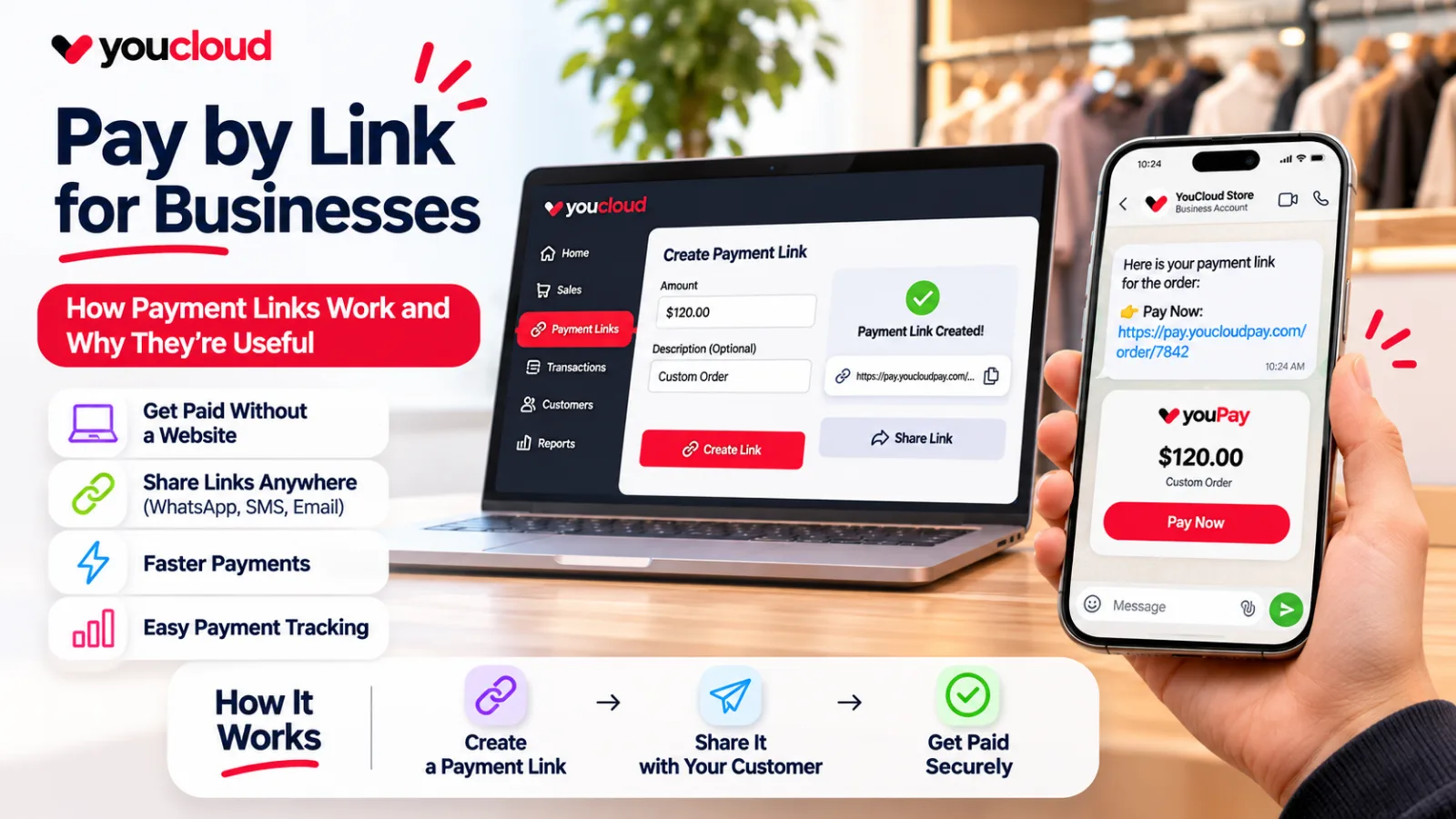
First, the merchant creates a payment link through a payment platform. Next, they share it with the customer through email, SMS or a messaging app.
The customer opens the link and checks the payment details. After that, they choose a payment method and complete the purchase.
Finally, the merchant checks the payment status before handing over goods or sending an order.
This process helps businesses collect payments without a physical card terminal.
How to Create a Payment Link
Most payment platforms follow a similar process. However, the exact steps may vary by provider.
- Sign in to your payment platform.
- Enter the amount and currency.
- Add an order number or payment note.
- Set an expiry date if needed.
- Create and copy the payment link.
- Share it with your customer.
- Check the payment status before closing the order.
Always check the amount and order details before sending the link. Also, make sure the customer knows which business has sent the payment request.
Benefits of Pay by Link for Businesses
Payment links can help merchants reach more customers and make daily tasks easier.
Sell Without a Website
Small businesses do not always have an online store. However, they can still accept online payments through a payment link.
This is useful for home-based shops and social media sellers.
Collect Payments From Anywhere
Customers do not need to visit a physical store to pay. Instead, they can complete the purchase from their phones or computers.
Reduce Payment Delays
A direct payment link gives customers a clear way to pay. As a result, businesses may spend less time chasing unpaid bills.
Make Payment Tracking Easier
Each link can include an order number or payment note. Therefore, staff can match payments with the right orders more easily.
Offer More Ways to Pay
Depending on the provider, customers may pay by card, mobile wallet or other methods. This gives them more choice at checkout.
Which Businesses Should Use Payment Links?
An online payment link can be useful across many types of businesses.
- Retail stores: Collect payments for phone orders and home delivery.
- Restaurants: Request deposits for large bookings or catering orders.
- Social media sellers: Accept payments for orders placed through Instagram or WhatsApp.
- Service businesses: Collect fees for bookings, repairs or completed work.
- Small businesses: Accept online payments without building an online store.
For example, a bakery can take a custom cake order through WhatsApp. It can then send a payment link to collect a deposit before starting work.
How to Use a Secure Payment Link
Safety matters when businesses accept payments online. Therefore, merchants should choose a trusted payment provider.
Follow these simple steps:
- Use links from your official payment platform.
- Check the amount before sharing a link.
- Avoid asking customers to share card details through messages.
- Set link expiry dates where possible.
- Confirm payment through your own dashboard.
- Never rely only on a payment screenshot from a customer.
In addition, train your staff to spot fake payment messages and check the status of each sale.
Why Connected Payments Matter
Payment links are useful, but they work best when businesses can track them alongside other sales.
For instance, a retailer may accept card payments in-store and send payment links for remote orders. If these records sit in separate tools, staff may struggle to check daily totals.
However, a connected payment setup can help merchants bring sales and payment records together.
To explore other ways to accept payments, read our guide to digital payment solutions for businesses.
Simplify Business Payments with YouCloud
YouCloud helps merchants bring sales, POS and payments into a connected platform.
Whether you run a retail shop, restaurant or growing business, the right payment tools can make it easier to serve customers and track sales.
Explore youPay payment solutions to find a payment setup that fits the way your business sells.
Frequently Asked Questions
Do I Need a Website to Use Pay by Link?
No. Businesses can share payment links through email, SMS or messaging apps without having their own online store.
Is Pay by Link Safe?
It can be safe when you use a trusted provider and follow good payment practices. Customers should also check the link before entering their details.
Can Small Businesses Use Payment Links?
Yes. Payment links are useful for small shops, home-based businesses and sellers who take orders through social media.
Can a Payment Link Expire?
Yes. Some payment providers allow merchants to set an expiry date. Once the link expires, customers may need a new one to complete their payment.