Kitchen Display System (KDS): How to Improve Restaurant Order Speed and Accuracy
Discover how a kitchen display system helps restaurants reduce order errors, speed up food preparation and improve communication between kitchen and service teams.
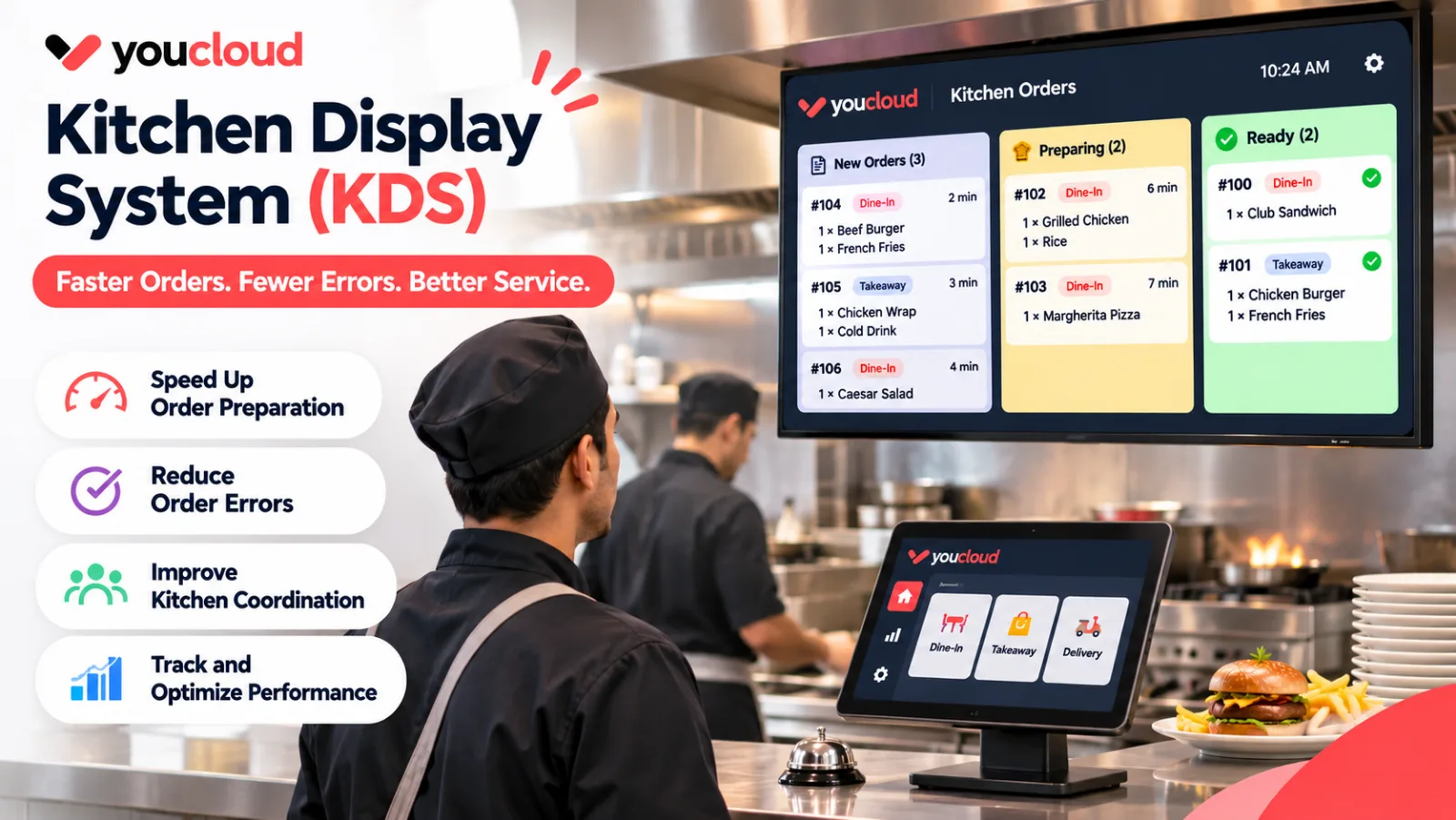
A kitchen display system helps restaurants manage orders, reduce errors and speed up food service. It replaces paper tickets with digital orders that kitchen staff can view on a screen.
During busy hours, even a small mistake can delay several orders. For example, a missing ticket or an unclear request can lead to the wrong meal reaching a guest.
With a connected kitchen system, staff can track orders and work together with fewer manual steps.
How Does a Kitchen Display System Work?
A kitchen display system, also known as a KDS, receives orders from the restaurant POS and displays them in the kitchen.
When a cashier or waiter places an order, the details appear on the kitchen screen. Staff can then prepare the food and update its status.
A typical workflow includes five steps:
- The front-of-house team enters an order.
- Order details reach the kitchen screen.
- Chefs review the items and special requests.
- Kitchen staff prepare the meal.
- Once the food is ready, staff mark the order as complete.
As a result, both teams can follow the progress of each order.
Why Paper Kitchen Tickets Can Slow Down Service
Paper tickets may work well in a small restaurant. However, they can become harder to manage as order volumes grow.
For example, tickets may get lost, damaged or placed in the wrong order. Staff may also find handwritten notes hard to read.
In addition, waiters often need to visit the kitchen to check if food is ready. These small tasks take time away from serving guests.
A digital kitchen display system helps solve these issues by keeping orders visible and easier to track.
Benefits of a Kitchen Display System for Restaurants
Faster Order Processing
During peak hours, kitchen teams need clear and timely order details. Digital tickets can reach the kitchen as soon as staff enter an order.
As a result, chefs can start work sooner without waiting for a paper ticket.
Better Order Accuracy
Guests often request changes to their meals. For instance, they may ask for less salt, extra cheese or no onions.
Clear digital order notes help staff see these requests. Therefore, they can reduce avoidable mistakes and food waste.
Improved Kitchen Communication
A kitchen order management system can help staff track pending, active and completed orders.
Instead of asking chefs for updates, the service team can use shared order status information when the system supports it.
Better Control During Busy Hours
Order timers can help staff spot meals that take too long. Meanwhile, managers can use preparation time reports to find delays.
With this information, teams can improve their workflow and plan for busy shifts.
How POS and KDS Work Together
A POS kitchen display system connects order entry with food preparation. This link is useful for restaurants that handle dine-in, takeaway and delivery orders.
For example, a guest orders a burger at the counter. The cashier adds the meal and any special requests to the POS. Next, the order appears on the kitchen screen.
Once the meal is ready, staff update its status.
This process reduces the need to enter the same order twice. However, restaurants should check which channels their POS and KDS can connect before choosing a setup.
Essential Kitchen Display Software Features
Not every restaurant needs the same kitchen tools. Before choosing kitchen display software, look for features that match your daily workflow.
- Order timers: Track how long orders take to prepare.
- Order routing: Send food items to the right kitchen station.
- Special instructions: Display food choices and guest requests.
- Order status updates: Track meals from preparation to completion.
- POS integration: Send orders from the POS to the kitchen.
- Performance reports: Review order times and kitchen delays.
Also, ask how the system handles order changes and lost internet connections. These details matter during busy service hours.
Kitchen Display System vs Kitchen Printer
Both tools help send orders to the kitchen. However, they work in different ways.
A kitchen printer creates paper tickets for staff to read. It provides a simple way to manage orders but offers limited live tracking.
In contrast, a kitchen display system can show order status, timers and updates on a digital screen.
For a small café with fewer orders, a printer may still be enough. Busy restaurants, on the other hand, may benefit from live order tracking.
The right choice depends on order volume, kitchen layout and staff needs.
How to Choose the Right KDS for Your Restaurant
First, review how orders move through your restaurant. Identify where delays and mistakes happen most often.
Next, check whether the KDS works with your existing POS. Ask for a demo that includes real menu items, special requests and order changes.
Finally, let your kitchen staff test the system. A simple display that staff can use with ease may offer more value than a complex setup with features they rarely need.
Simplify Kitchen Operations With youResto
Separate ordering and kitchen tools can create extra work for restaurant teams. A connected setup helps staff manage service with fewer manual steps.
youResto restaurant POS brings ordering, billing and kitchen workflows into a connected restaurant management platform.
Whether you run a café, a fast food outlet or a full service restaurant, start with tools that match your kitchen needs.
Ultimately, the goal of a kitchen display system is to help teams prepare the right orders, reduce delays and deliver a better guest experience.
Explore youResto to find the right setup for your restaurant.