Checkout Optimization: How to Reduce Payment Failures
Checkout optimization helps businesses reduce payment failures and improve the customer experience. A simple checkout process makes it easier for customers to pay. As a result, businesses can reduce lost sales and improve payment success rates.
What Is Checkout Optimization?
Checkout optimization is the process of making it easier for customers to complete a purchase. It covers everything from choosing a payment method to receiving a payment confirmation.
The goal is simple: remove barriers between the customer and a successful sale.
For example, an online store may reduce the number of checkout steps. Meanwhile, a restaurant may offer QR payments to help guests pay without waiting for the bill.
Both approaches help create a better customer experience.
Why Do Payments Fail?
Not every payment failure happens for the same reason. Some issues come from the customer's bank, while others come from the payment system or checkout process.
Common causes include:
- Incorrect card details.
- Insufficient funds.
- Expired payment cards.
- Poor internet connections.
- Payment gateway errors.
- Bank security checks.
- Incomplete payment verification.
However, businesses cannot control every reason for a failed payment. They can still improve their checkout process and give customers a clear way to try again.
7 Checkout Optimization Tips to Reduce Payment Failures
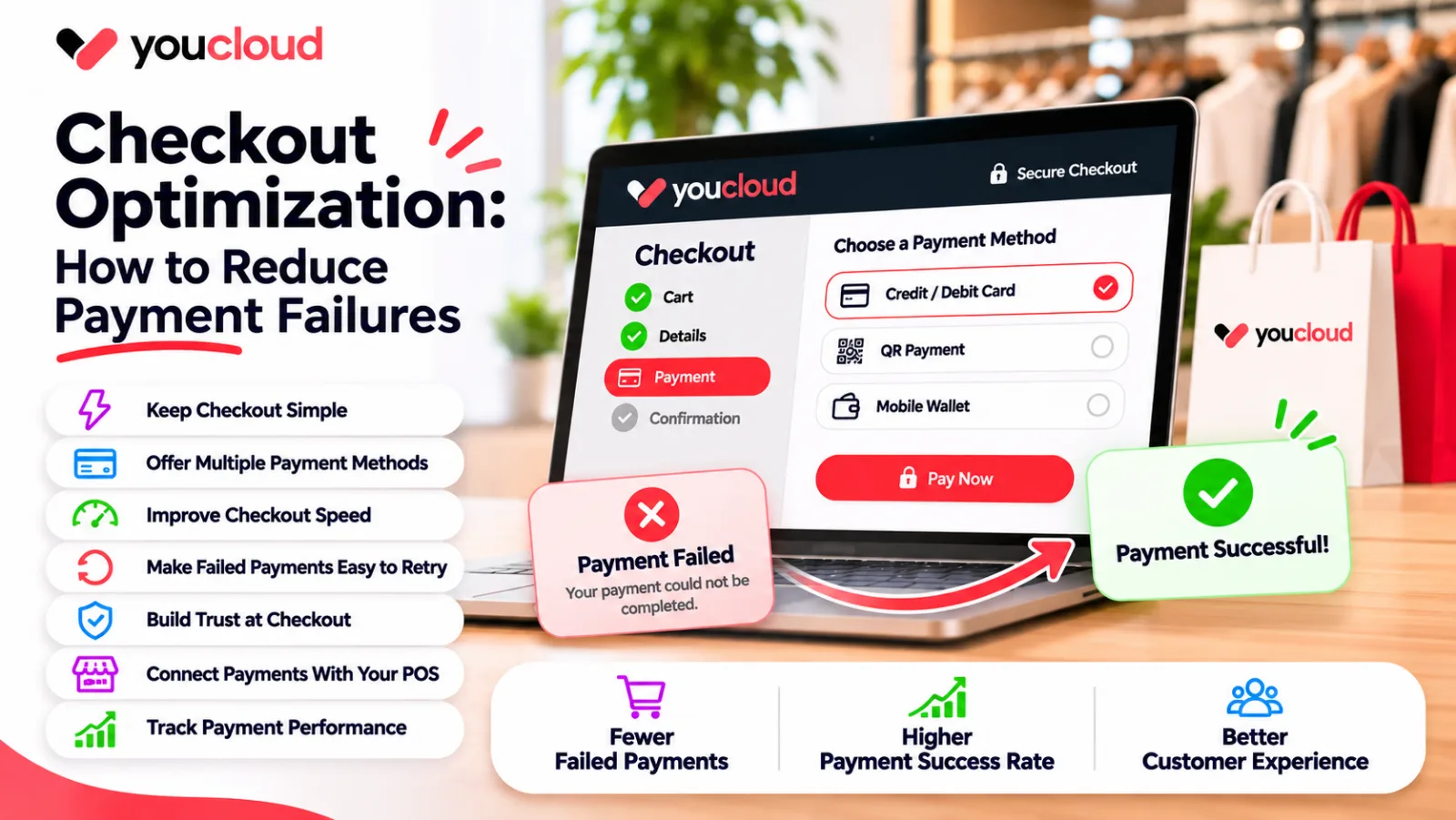
1. Keep the Checkout Process Simple
Long checkout forms can frustrate customers. Therefore, ask only for the details you need to complete the sale.
Allow guest checkout where possible. Also, show the full order cost before customers reach the payment page.
Fewer steps make it easier for people to finish their purchases.
2. Offer Multiple Payment Methods
Customers have different ways of paying. Some prefer cards, while others use mobile wallets or QR payments.
For instance, a customer whose card gets declined may still be able to pay with another method.
By offering more payment options, you give customers another way to complete the sale.
3. Improve Checkout Speed
A slow payment page can cause customers to lose patience. In addition, unclear loading screens may leave them unsure about whether their payment went through.
Keep checkout pages light and easy to use. Test them on both phones and computers.
Similarly, retail stores should check their payment terminals and internet connections before busy sales periods.
4. Make Failed Payments Easy to Retry
When a payment fails, customers need clear instructions.
Instead of showing a vague error message, explain the next step. For example, ask the customer to check their card details or choose another payment method.
However, confirm the status of the first payment before asking them to retry. This helps prevent duplicate charges.
5. Build Trust at Checkout
Customers want to know that their payment details are safe.
Use a secure payment page, clear business details and familiar payment options. Moreover, display the final price, including any taxes and fees, before the customer pays.
A clear and trustworthy checkout can help reduce checkout abandonment.
6. Connect Payments With Your POS System
Separate payment and billing tools can make daily tasks harder. Staff may need to enter amounts twice or check sales across different systems.
Instead, connect payments with your POS system where possible.
This can help staff match payments with sales, reduce manual errors and track daily transactions more easily.
7. Track Payment Performance
Payment optimization should be an ongoing task. Review your payment data to find out where customers face problems.
In particular, track failed payments, common decline reasons and checkout completion rates.
Once you spot a pattern, you can work with your payment provider to fix the issue.
How to Measure Checkout Performance
Businesses should track a few key numbers to understand how well their checkout works.
- Payment success rate: The share of payment attempts that succeed.
- Checkout abandonment rate: The share of customers who start checkout but do not finish.
- Failed payment rate: The share of payment attempts that fail.
- Checkout time: How long customers take to complete a purchase.
For example, if 950 out of 1,000 payment attempts succeed, your payment success rate is 95%.
By tracking these numbers over time, you can see whether your changes are helping.
Prepare Your Checkout for Peak Sales
Busy sales periods such as Black Friday, holiday sales and seasonal promotions can put extra pressure on payment systems.
Before a major sales event, test your payment methods, check your internet connection and train staff to handle failed payments.
Also, make sure customers have another way to pay if their first option fails.
Good preparation can help your business avoid delays and protect sales during busy hours.
Improve Your Checkout Experience With YouCloud
Your customers should not have to struggle to complete a purchase. Likewise, your staff should not have to manage disconnected billing and payment tools.
With youPay by YouCloud, businesses can explore payment solutions for in-store and online sales.
From card payments to QR payments and payment links, the right payment setup can help businesses create a smoother checkout experience.
Start improving your checkout today. Explore youPay and book a demo to find a payment solution that fits your business.