How Does POS Inventory Management Actually Work?
Stock errors can cost your business sales. Learn how POS inventory management updates stock, tracks sales and helps you manage products across outlets.
POS inventory management should help you answer one question quickly: do you have enough stock to make the next sale? A popular product might be sold out in one branch while another has boxes sitting in storage. Without a clear view, you risk lost sales, rushed orders and money tied up in slow-moving items.
Here is how a connected POS handles stock during a normal business day, and what you should check before choosing one.
1. Start With Stock Numbers You Can Trust
Before a POS can show reliable numbers, your product list and opening quantities must be correct. Add each product, its price and available stock. Track sizes or colours separately when needed.
For example, entering 50 units when you only have 40 means every later report starts with the wrong figure. A stock count before launch helps prevent that problem.
What to check: Can staff correct stock quantities and record why a change was made?
2. POS Inventory Management Updates Stock After Each Sale
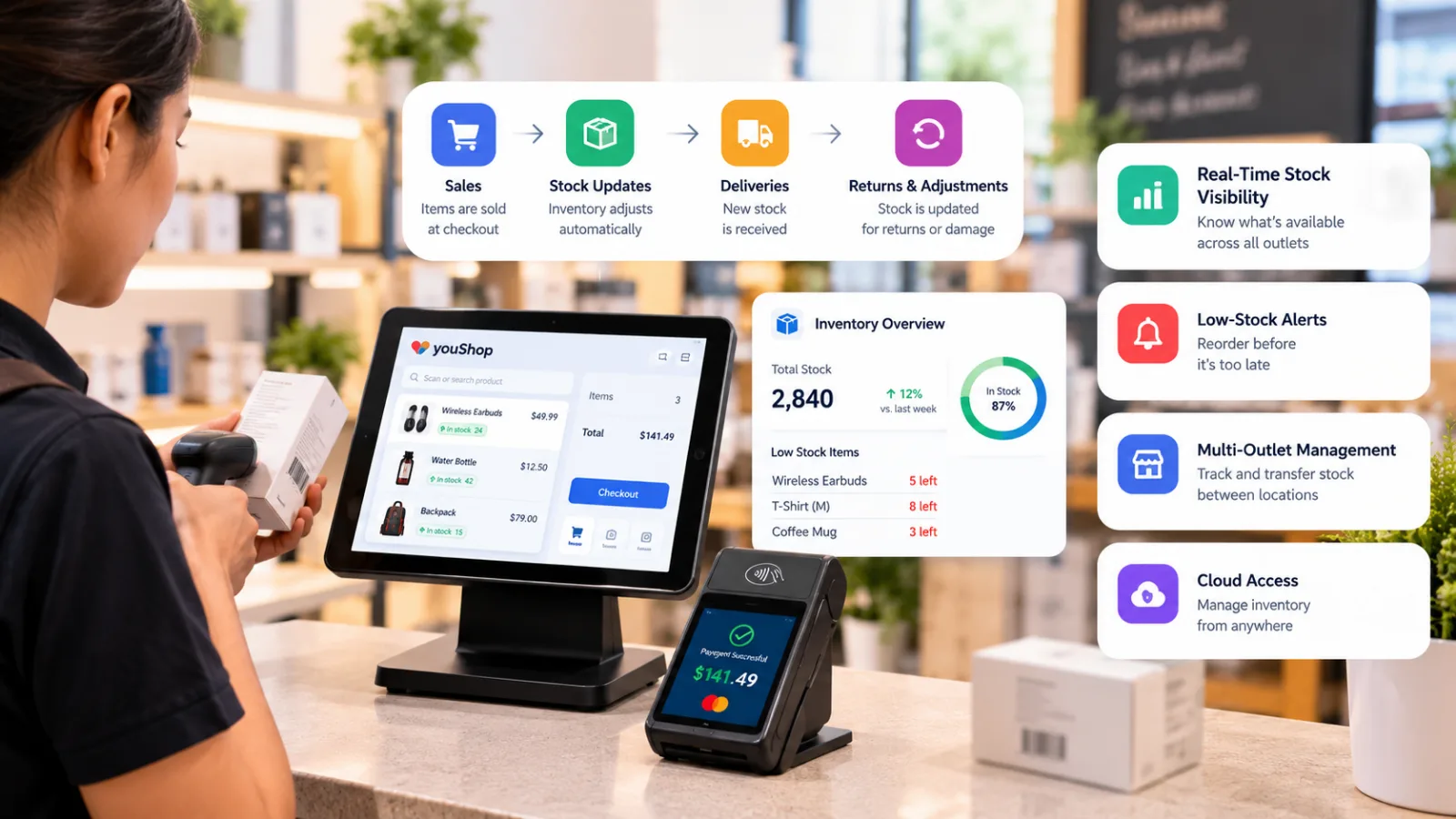
Imagine your shop starts the morning with 30 water bottles. Customers buy eight, so the system should show 22 left.
When a POS connects billing with inventory, staff do not need to update a separate spreadsheet after every transaction. That saves time and helps prevent selling products that are no longer available.
youShop connects retail billing and inventory tracking, so stock records update as products are sold.
What to check: Ask for a live demo. Sell one item and see whether its available quantity changes.
3. Deliveries, Returns and Damage Also Change Stock
A sale is not the only reason stock moves.
Suppose a supplier delivers 20 more bottles. Your team records the delivery, taking the count from 22 to 42. Later, two bottles are damaged and removed from available stock. The new count is 40.
Returns need attention too. An item that can be sold again should be treated differently from a damaged return.
youShop also offers AI OCR supplier bill capture to reduce manual entry. However, staff still need to check deliveries and record stock changes correctly.
What to check: Can your team record deliveries, adjustments and returns without losing track of what changed?
4. Low-Stock Alerts Help Prevent Missed Sales
Finding out that an item is unavailable when a customer asks for it is too late.
Low-stock alerts help your team spot products that need attention before shelves are empty. For instance, a fast-selling item might need a reorder warning at 20 units, while a slower item needs one at five.
youShop supports low-stock alerts. Set the levels based on how quickly products sell and how long suppliers take to deliver.
Business benefit: Fewer emergency orders and a better chance of keeping popular items available.
5. Multiple Outlets Need One Clear Stock View
Managing stock becomes harder when you run two or more shops.
One branch may be short of an item while another has plenty. Instead of buying more immediately, you could move stock between locations.
With youShop, owners can view stock across shops and manage transfers. When 15 units move from Shop A to Shop B, the transfer should be reflected in both locations.
What to check: Ask the provider to demonstrate a transfer and show the updated stock figures for each outlet.
6. Check What Happens When the Internet Goes Down
A busy shop cannot stop serving customers every time the connection drops.
youShop supports offline billing with later syncing. However, you should confirm which inventory changes are stored offline, when they appear in reports and how the system handles changes made at different outlets.
During a demo, complete a sale without internet access. Reconnect and check the stock count rather than relying on a promise.
Restaurants have different needs. youResto helps manage orders, kitchen workflows and menu availability. If you need ingredient-level stock tracking, ask whether your chosen setup supports recipes or a connected inventory tool.
7. Use Reports to Make Better Buying Decisions
Accurate stock records help you make decisions beyond the checkout counter.
Useful reports should answer practical questions:
- Which products sell fastest?
- Are certain items sitting on shelves too long?
- Does another outlet need stock?
- When should you place the next supplier order?
Sales and inventory reports can help you avoid overbuying slow-moving products while keeping popular ones in stock.
Of course, reports only work when staff record deliveries, damage and transfers. Regular physical counts still matter.
Choose a POS That Makes Stock Easier to Manage
Good POS inventory management should give you fewer surprises, less manual work and a clearer view of where your money is tied up.
For retail businesses, youShop brings billing, stock tracking, low-stock alerts and multi-outlet visibility together. Features can vary by plan and setup.
Explore YouCloud and request a youShop demo. Ask the team to show a sale, a delivery, a low-stock alert and a transfer between outlets using products like yours.